
Traffic Court Records in Yoakum County
Where a Yoakum County traffic case starts depends on where the stop happened. Four doors exist. They are JP Precinct 1 in Plains, JP Precinct 2 in Denver City, Denver City Municipal Court, and Plains Municipal Court. The issuing agency and the location of the alleged offense offer clues. The citation itself beats both. Each court keeps its own case record. An appeal can move a traffic case up to County Court. A county docket at that stage may carry labels such as “SPEEDING (APPEAL)” or “Misdemeanor Traffic.” That entry belongs to a different stage and a different custodian. It does not replace the lower-court record.
Yoakum County Traffic Record Courts
The Yoakum County Justice Courts page maps the county's two JP routes. Precinct 1 sits in Plains. Precinct 2 is at 201-A North Main in Denver City. The municipal courts are city courts. They stay separate from both precincts.
| Court | Local contact | Record route |
|---|---|---|
| JP Precinct 1 | 806-456-7491 ext. 293 | Call or visit the Plains precinct office |
| JP Precinct 2 | 806-592-3963 | Call or visit 201-A North Main |
| Denver City Municipal | 806-592-8880 | Use the city court clerk |
| Plains Municipal | 806-456-2288 | Use the city clerk route in the OCA directory |
The county's official Justice Courts page serves as the JP access point for local citation contacts and payment routing. It is not a case-number search. The issuing court still has to confirm the traffic record and date.
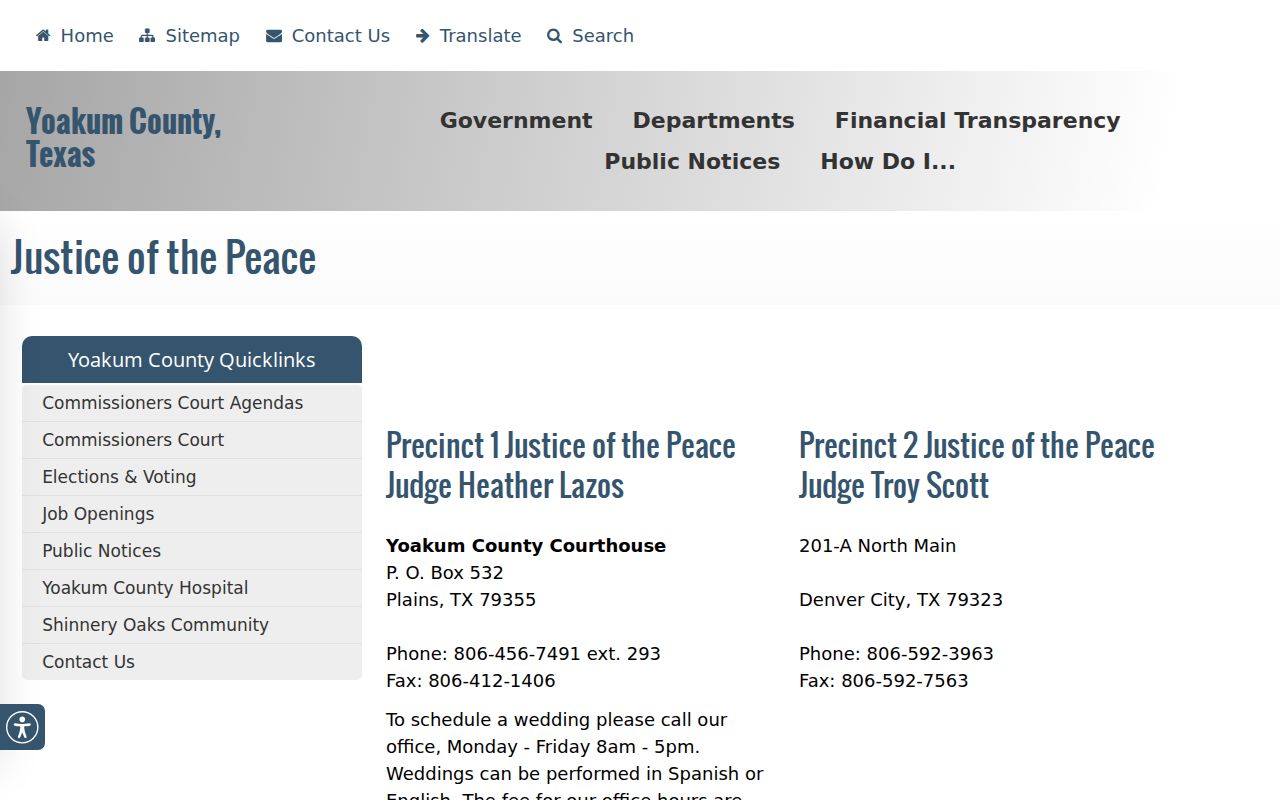
The JP page handles contacts and payments, not case lookup. The issuing court must confirm the traffic record and date.
How to Look Up a Traffic Ticket
Yoakum County offers no official citation lookup that lays out a full set of public fields. The county JP page links Certified Payments and lists bureau code 1706609. It shows no county-specific citation search form, no balance field, no convenience fee, and no refund terms.
- Read the ticket for the issuing court, citation number, and appearance date.
- Use the official court page or the county's Certified Payments link only after confirming the court and amount.
- Call the issuing court with the citation number when no public result appears.
- Visit the court counter if a copy or a direct file inspection is needed.
- For a mailed plea or request, follow that court's current instructions and keep proof of delivery.
re:SearchTX can include participating district or county data, but it is not a complete JP or municipal traffic feed. OCA's directory supplies contacts, not case lookup.
Yoakum County Traffic Payment Limits
A payment gateway is not the whole docket. The county's vendor route handles money, not case files. It shows no status, disposition, setting, warrant, receipt, or full case history. Confirm the citation number and the correct bureau code before you enter payment data. Skip unofficial traffic search services. A missing vendor result can mean several things. The case has not posted yet. The citation belongs to another local court. Or the vendor only takes payments. Call the clerk. An empty payment screen does not prove the case ended.
Yoakum County Traffic Record Gaps
A citation can fail to appear through the payment link. The court still has a live case. The case may be new. It may be assigned to a different JP or municipal court. Or it simply sits outside what the vendor displays. No official countywide portal joins every field, date, disposition, payment, and lower-court record. Resolve the gap through the issuing court and the citation number. Call the clerk. Ask whether the citation has been filed. Request the current appearance date and case status. Write down the date of your call. Never trade the printed appearance date for a guess based on an empty screen.
Finding Your Traffic Court Date
The appearance date printed on the citation controls. The official Texas Court Help traffic page requires you to appear by that date. Appearance can happen in person, by mail, or by delivering a plea in person. A phone call or email alone does not count.
| Citation number | Use the exact identifier printed on the ticket, not an invented local format. |
|---|---|
| Issuing court | The named JP or municipal court is the first custodian. |
| Appearance date | The date on the citation; confirm any later written setting with the court. |
| Plea or setting | Ask whether the file reports a plea, hearing, trial, reset, or disposition. |
| Case status | Confirm through the court record rather than relying only on the payment screen. |
For a county-level traffic appeal, check the current County Court docket against the lower-court case. The Yoakum County court calendar explains why a posted date still needs confirmation.
Yoakum County Municipal Traffic Records
The Denver City Municipal Court page lists a street address of 201 N. Main Street. It also names Judge Troy Scott and lists 806-592-8880. A city page shows an email address, but official presentations differ. Call before sending case data. The related city citation page offers information but no unified docket fields. The OCA municipal directory dated August 7, 2025 lists Plains Municipal Court at P.O. Box 145, Plains, Texas 79355. The same listing gives phone 806-456-2288, fax 806-456-4341, and coplains@windstream.net. Stephen Marc Traweek appears as judge on that dated listing. Reconfirm current contacts and procedure before you file or request a copy.
Paying or Contesting a Ticket
Texas Court Help lays out the three pleas: guilty, not guilty, and no contest. Payment can carry a plea and a reported court disposition. Contesting a ticket usually starts with a not-guilty plea and a later setting. The court sets the forms, proof, and deadlines. No general web deadline can replace the printed appearance date.
| Paying | Contesting |
|---|---|
| Confirm the court, citation, balance, and official payment route. | Enter a not-guilty plea through the method allowed by the issuing court. |
| Ask how the plea and disposition will appear in the court file. | Obtain and confirm the trial or hearing setting. |
| Keep the receipt and later verify that the court posted it. | Keep the filed plea, delivery proof, and setting notice. |
Do not miss the appearance date: A call or email is not an appearance under the cited Texas Court Help guidance. Contact the issuing court promptly for the permitted response.
Cannot pay at once? Ask the court. After you appear and supply the required financial information, options may include a payment plan or community service. The court decides who qualifies.
Yoakum County Traffic Citation Options
Deferred disposition, defensive driving, warrants, and occupational-license questions each carry their own rules and deadlines. Denver City's code covers municipal-court special expenses, but a code page will not show your balance. Nor does it promise any option is open. Get the current form, fee, deadline, and proof rules straight from the clerk at the issuing court.
Skip any payment link you cannot verify. Start at the county Justice Courts page or the official city court page, then confirm the citation number and amount with the clerk before you pay. A vendor can run the transaction. The court still keeps the case record.
Yoakum County Traffic Record Terms
A Yoakum County Court docket borrows its labels from ordinary misdemeanor practice when a traffic appeal lands there. Arraignment is a plea-stage event. A status hearing tracks case progress. A guilty-plea label reports one docketed step, but the signed judgment is what controls.
Read each entry at its own court level. The lower-court citation, the County Court appeal setting, and any final signed order are three separate records. Match the dates and cause numbers before you build a timeline. When a short label leaves you guessing, ask the clerk. Confirm whether the event actually happened as scheduled.
Court Traffic Record vs Driver Record
These are two files, kept by two different offices. The court traffic record covers the citation case itself. The issuing court's clerk holds it. A state driver record belongs to the Texas Department of Public Safety instead. Knowing that split keeps your request from landing at the wrong office.
| Court traffic record | State driver record | |
|---|---|---|
| Custodian | Yoakum County JP, city municipal clerk, or County Clerk on appeal | Texas Department of Public Safety |
| Core content | Citation, plea, settings, filed papers, and reported disposition | State-maintained driving-history data |
| Request route | Issuing court counter, phone, mail, or approved local channel | Texas DPS record process |
A court docket lookup will not tell you what the state file says. For the case, stay with the issuing court.
Yoakum County Traffic Record Appeals
An appealed traffic matter can show up on a Yoakum County Court docket. The label may read misdemeanor traffic or speeding appeal. That docket may list an arraignment, a status hearing, or a guilty plea. Each label is one procedural step. It is not the whole story of the case below.
Want the full picture? Ask the County Clerk for the appeal file and the lower clerk for the original municipal or JP record. Match the court, the cause number, the original citation, and the date across both. Keep the two files separate until the filed documents confirm they line up.
Request Yoakum County Traffic Records
For a copy, name the issuing court, the citation number, and the exact item. Add the date range. Ask for a docket sheet. Or ask for the citation, a plea, a setting notice, a disposition, or a certified copy. A vague "traffic history" request slows things down. The JP and municipal clerks each maintain their own files, and the County Clerk holds any County Court appeal record.
Ask whether the office takes requests at the counter, by mail, fax, or email. No single local form or copy fee covers every traffic court. Before you send money or personal details, get the cost, accepted payment, redaction limits, and delivery method.
Fees and Copies
Yoakum County's JP and municipal courts do not publish one shared traffic-case copy schedule. The County Clerk's 2024 fee schedule lists plain, certified, and authenticated copy rates, yet it does not fix every local traffic fee or a current vendor charge. Ask the office that actually holds the record before you order.
| Item | Posted or verified fee | What to do |
|---|---|---|
| County Clerk plain copy | $1 per page | Confirm that the schedule applies to the appeal record |
| County Clerk certified copy | $5 plus $1 per page | Confirm current amount before payment |
| JP or municipal copy | Fee not located | Call the issuing court |
| Certified Payments transaction | Fee not located | Confirm amount and official link first |
A mailed copy request should name the citation, court, date range, and whether you want a plain or certified form. Confirm payment and delivery options first.
Verify Yoakum County Traffic Records
Keep the citation, your search date, the official URL, any payment receipt, and every written setting. Compare the issuing court, citation number, appearance date, plea, and reported disposition across them. If a result is missing, call the court. Silence is not a case outcome.
Stick to neutral wording like "the docket lists" or "the clerk reports." A charge is not a judgment. A setting is not a result. A vendor screen is not the case file. Those distinctions keep a Yoakum County traffic court record anchored to the real public case and its custodian.